This is my first blog entry, and I decided to write it in response to a article I read by Jeff Newcomer posted on the New England Photography Guild's Facebook site. He wrote about a recent experience in which he had planned for a photoshoot of a lighthouse during sunrise. He did all of his pre-shoot planning using The Photographers Ephemeris to line up his shot perfectly for that sunrise, scouted out the scene during the daytime, and even set up a little marker for where he would shoot it come the next morning. After getting up at an ungodly hour to make it to his perfect spot, he encountered a force that all photographers face, good 'ol Mother Nature. He got to his scene, and realized that he wouldn't be able to take the shot he envisioned because of the overcast morning was blocking the sunrise he had hoped for. Being an experienced photographer, he made the best of it and ended up with a few great shots. But it got me thinking... how can we (as photographers, whether for fun or for a profession) try to have a little better prediction of what the clouds will be like when doing landscape photography?
Along with being a novice photographer, I'm also a pilot. One thing that has an affect on every flight, and every pilot [should] check prior to departure is the weather. Sometimes during mission planning, and again before takeoff of the conditions require it. When I say check the weather, it's more than just watching the local "weather on the 8's" on the Weather Channel or going to www.weather.com. These weather resources are great for a general overview who wants to know "is it going to rain or not?". However, this doesn't help pilots. What does "Partly Cloudy" or "Mostly Sunny" mean? To pilots, this is far too vague and doesn't help when you're trying to fly VFR (visually) or IFR (in the weather on your instruments). There are several resources pilots use to help get a better picture of what the weather is actually doing, versus seeing "partly cloudy skies". Reading Jeff's blog entry made me think about how these same resources can help photographers in their "mission planning".
One main resource pilots use for mission planning is http://aviationweather.gov. This is a NOAA produced web site to help pilots. It includes forecasts and current observations in many formats. How does this help photographers? There are a few resources here that I think they can use. The first is the METAR (current observation) and TAF (Terminal Aerodrome Forecast). What I think can help photographers is the cloud layers and visibility described METAR and TAF. It may require a little extra effort, but if you do all the planning for a specific shot, and then realize that there are low clouds and poor visibility - all that planning was for naught. Chances are, wherever you're shooting there's SOME kind of airport nearby. You may not know about them because they're small and non-towered, but most have some sort of weather reporting capability. To check the cloud and visibility, the METAR is the current observation and is shown for this moment. Click "METARs >> METAR Request Form" on the left side of the page.
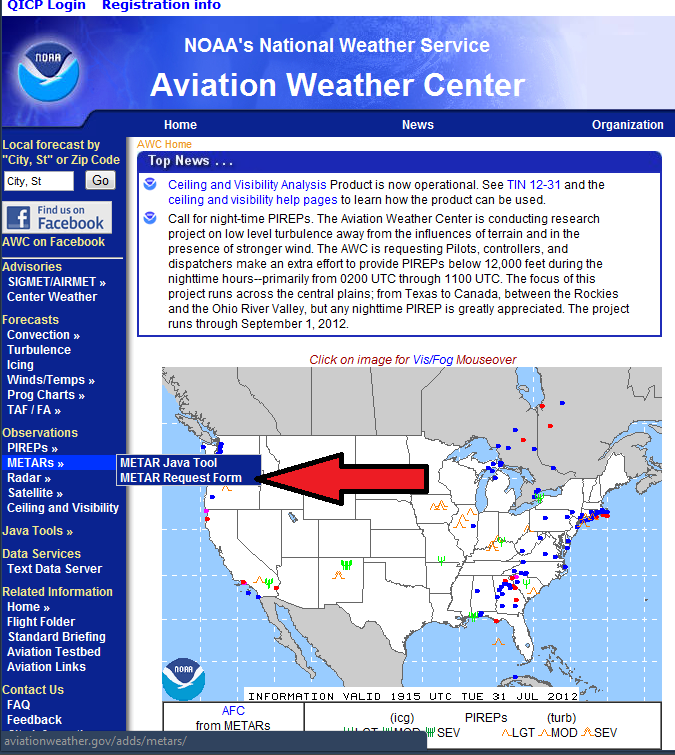
When that page comes up, type in the identifier of the airport near you, or where you're shooting. For example, if I wanted to go do a lighthouse photo-shoot in Newport, Rhode Island, I can look at the weather for Newport's airport (KUUU), Quonset right across the bay (KOQU), Providence TF Greene (KPVD), and maybe Westerly, RI (KWST) to help build an overall picture of what the weather is doing. Maybe if the weather down in Westerly was significantly different, I'd divert and head down there for a nice lighthouse photo-shoot.
Note: all domestic airports have a 'K' at the beginning of their identifier (for example, Boston Logan International is KBOS). If you don't type the K, you could get an airport somewhere in Europe or elsewhere in the world.
Make sure you check the box next to METAR and TAF (not all small airports will have a TAF, but airports like Providence definitely do), and make sure you click the "Translated" bubble. If you want to click the RAW and learn the format - be my guest. We do as pilots (it's quicker to read when you know what it says), but you certainly don't need to learn it.
When you click "Submit", it will bring you to a new page with all of the information you want. The "Translated" page its pretty self-explanatory. The small airports might only have a METAR (observation) but the TAF has a 24 hour forecast (note the times are all in UTC - Greenwich Mean Time, so you need to know what time zone you're in, and whether or not you're in daylight savings time to determine what the local time is). As you see here, it has more detailed information about the cloud layers and visibility. If you want to go photograph something at a distance, but the temperature/dew point spread is low - you may have a fog/haze layer with poor visibility, making the shot difficult to impossible.
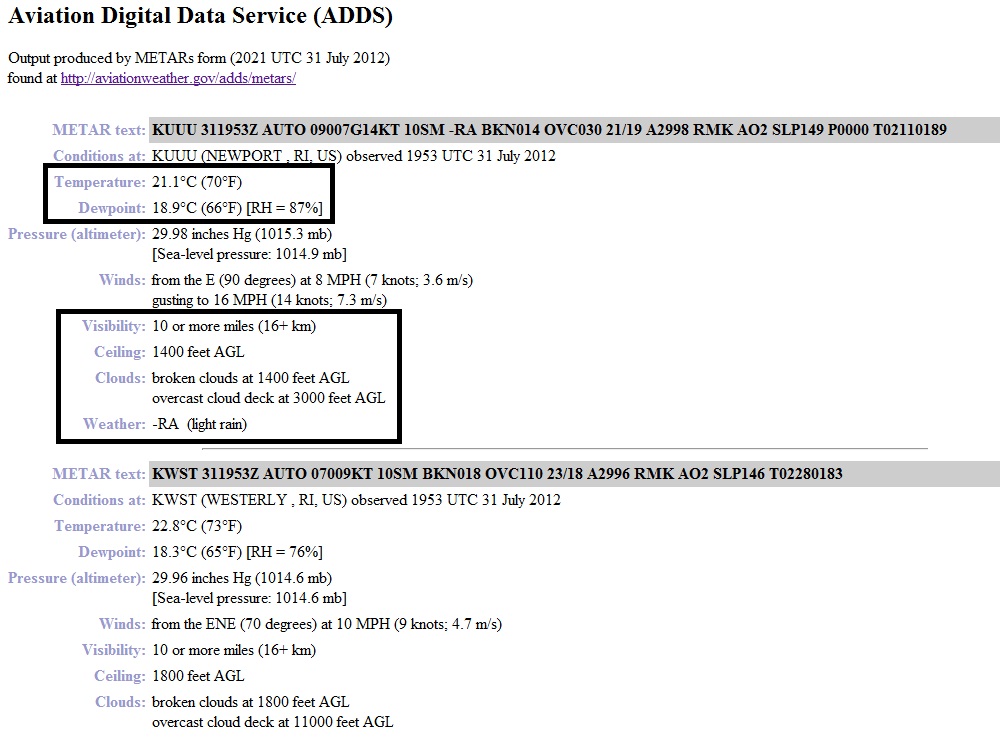
Most of this stuff can now be seen on weather.com, but what isn't shown is the actual ceiling and cloud deck (FYI - AGL means Above Ground Level, how high the clouds are above the ground). This can play a factor in sunrise/sunset photography. High clouds can be great to get the reflection of sunset about 20 minutes after the sun has ducked down below the horizon. What's also good about this report is the cloud coverage's are defined by 1/8ths of the sky as seen below.
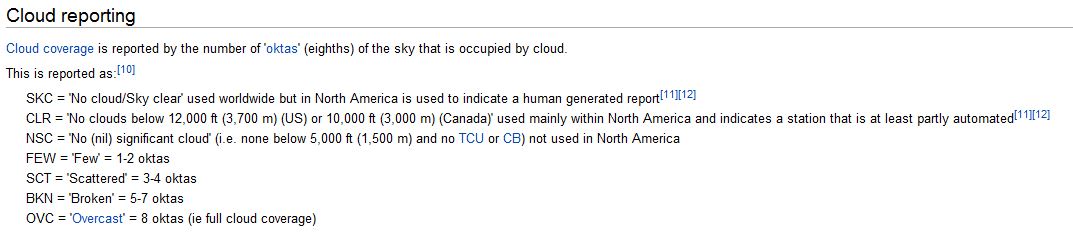
So this helps to define what the clouds are doing, unlike the "Partly Sunny" versus "Mostly Cloudy". For example, a FEW (1/8 - 2/8 cloud coverage) or SCT (3/8 - 4/8 cloud coverage) layer at 10,000 feet AGL might be great for that sunset or sunrise glow which allows the sun to peak under the clouds and have that bright red-orange reflection. But if you have a SCT or BKN layer around 3,000 feet AGL, the sun most likely won't show under the clouds, and you'll get washed out (as Jeff did).
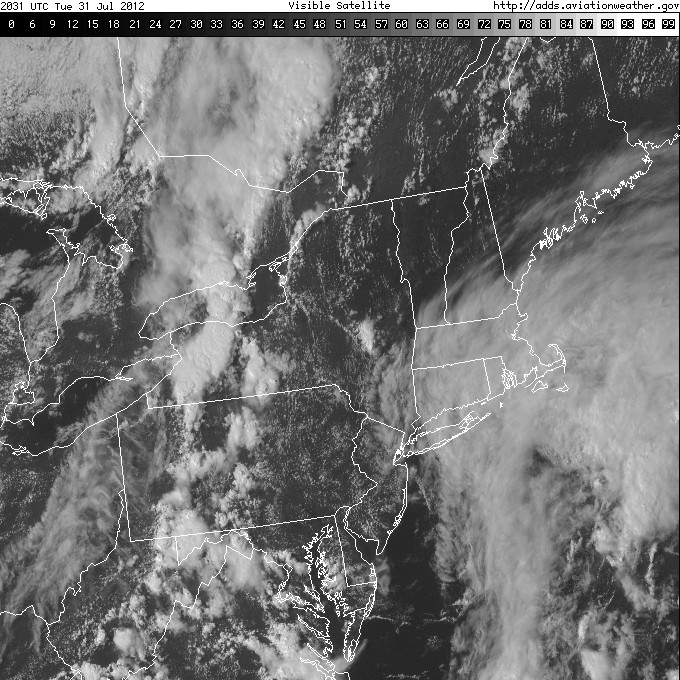
Another useful tool that aviationweather.gov has is the Satellite Imagery by region and can show where cloud layers end and where they begin to also help your photography planning. Maybe the clouds are moving and you're looking to see if they're going to be a factor 12 hours from now for that sunrise shoot, well the TAF and the satellite imagery can help to build that picture.
If you really want to get down to the nitty-gritty, you can look up the Winds Aloft at the cloud layer altitude, see what direction they're coming from and try to help predict if those pesky clouds will affect your shot. This information can also be found on mobile devices (for iPhone/iPad there's an "Aviation WX" app with the same information).
I thought I would share some tools that could benefit some photographer from having to get to their landscape scene, only to find out that they can't get the shot that they want. However, don't let the weather deter you from trying to find that great shot - take advantage of every opportunity and make do with the cards you're dealt!
Cheers,
Max

